VLAN Configuration: A Complete Guide to Virtual LAN Setup
Introduction
As networks scale, flat Layer 2 designs become inefficient and insecure. That’s where VLANs (Virtual LANs) come in, enabling you to segment traffic logically without requiring separate physical infrastructure.
In this VLAN configuration guide, you’ll learn what VLANs are, how they work, why they’re used, and how to configure them using switches, routers, and command-line interfaces. We’ll include diagrams and practical use cases. Finally, we’ll explore how noBGP takes network segmentation beyond VLANs for cloud-native and hybrid environments.
What is a VLAN?
A VLAN (Virtual Local Area Network) allows you to partition a physical network into multiple logical broadcast domains. Devices in the same VLAN can communicate as if they were on the same switch, even if they’re physically separated.
Benefits of VLANs:
- Traffic segmentation: Isolate groups like HR, Finance, or IoT devices.
- Security: Restrict traffic between VLANs using ACLs or firewalls.
- Performance: Reduce broadcast domain size.
- Scalability: Support large networks without redesigning physical topology.
VLAN Tags and Trunks
VLANs rely on IEEE 802.1Q tagging, where each Ethernet frame includes a VLAN ID.
Types of Switch Ports:
- Access port: Assigned to a single VLAN; for end-user devices.
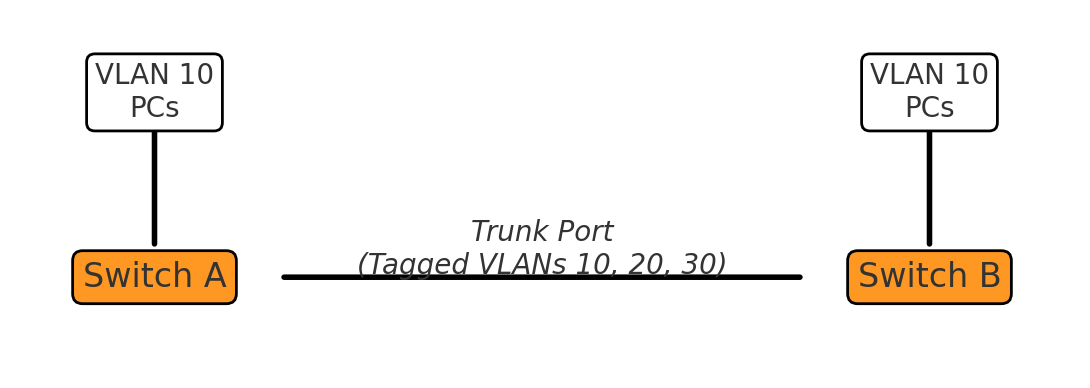
- Trunk port: Carries multiple VLANs; used between switches or routers.
Port Type
Description
Use Case
Access Port
Belongs to one VLAN only
PC, printer, IP camera
Trunk Port
Tags frames with VLAN ID (802.1Q)
Switch-to-switch or switch-to-router links
Example VLAN Diagram
VLAN Configuration (Cisco CLI Example)
1. Create VLANs
Switch(config)# vlan 10 Switch(config-vlan)# name HR Switch(config)# vlan 20 Switch(config-vlan)# name Engineering
2. Assign Ports to VLANs
Switch(config)# interface fastethernet 0/1 Switch(config-if)# switchport mode access Switch(config-if)# switchport access vlan 10
3. Set Up Trunk Port
Switch(config)# interface gigabitethernet 0/1 Switch(config-if)# switchport trunk encapsulation dot1q Switch(config-if)# switchport mode trunk Switch(config-if)# switchport trunk allowed vlan 10,20
Router-on-a-Stick (Inter-VLAN Routing)
To enable communication between VLANs, traffic must be routed—often using a router-on-a-stick setup:
Router(config)# interface gigabitethernet 0/0.10 Router(config-subif)# encapsulation dot1Q 10 Router(config-subif)# ip address 192.168.10.1 255.255.255.0
Repeat for each VLAN. This creates a subinterface for each VLAN with a separate IP address.
Real-World Use Cases
Scenario
VLAN Setup
Office segmentation
HR: VLAN 10, Engineering: VLAN 20
IP camera isolation
Cameras: VLAN 30
Guest Wi-Fi network
Guest VLAN 50 (separate from internal)
Data center rack layout
Each rack or tenant in its own VLAN
Common VLAN Troubleshooting Steps
Symptom
Cause
Fix
Devices can't reach each other
VLAN mismatch
Check switchport VLAN assignment
No internet on VLAN
Missing default gateway
Assign correct gateway via router
Inter-VLAN routing fails
Missing subinterfaces or ACLs
Configure router-on-a-stick or SVI
Trunk doesn't pass traffic
VLAN not allowed on trunk
switchport trunk allowed vlan
Limitations of VLANs
While VLANs are essential in LAN and campus environments, they come with drawbacks:
- Manual setup: Every device and switch must be configured properly.
- Not cloud-friendly: VLANs don’t extend across cloud environments.
- IP/subnet dependence: Devices are still grouped by subnet.
- Layer 2 boundary: Routing still needed to cross VLANs.
In cloud-native environments with dynamic workloads, VLANs don’t scale well. They weren’t designed for Kubernetes pods, serverless workloads, or multi-region deployments.
How noBGP Redefines Segmentation
VLANs are a legacy solution for segmenting Layer 2 networks. But they’re brittle, manual, and limited to local networks. noBGP replaces VLANs with policy-based, service-level segmentation that works across clouds, containers, and data centers.
Key Benefits of noBGP over VLANs:
- No subnets or IP grouping
- Segmentation is based on identity, not IP range.
- Works across environments
- Create private, secure connections between workloads on AWS, Azure, on-prem, or Kubernetes—no VLANs needed.
- Dynamic and programmable
- Use policy and automation, not CLI and cables.
- End-to-end encryption
- VLANs don’t encrypt traffic—noBGP does by default.
- No Layer 2 broadcast domains
- noBGP eliminates ARP storms, DHCP scope management, and L2 spanning-tree complexities.
Summary: VLANs vs noBGP Segmentation
Feature
VLAN Configuration
noBGP
Layer
Layer 2
Layer 3+ identity-based
Cross-cloud support
❌ No
✅ Yes
Manual setup
✅ Required
❌ Policy-driven
Broadcast domains
✅ Present
❌ None
Security
ACLs + VLANs
End-to-end encryption + policy
Granularity
Per-port or per-subnet
Per-service or workload
Final Thoughts
VLANs are still useful, but they’re increasingly outmatched by today’s distributed, cloud-first infrastructure. You can’t trunk VLANs to AWS or segment Kubernetes pods using switch CLI.
noBGP brings segmentation into the modern era with policy-based, identity-driven networking that doesn’t rely on physical topologies or subnet math.
If you’re tired of managing VLANs, trunks, and static IPs, it’s time to choose a path that scales.
