
Network Troubleshooting: A Step-by-Step Guide for IT Professionals
Introduction
Even the most advanced networks break. When they do, you need more than intuition—you need a structured troubleshooting process. Whether you’re diagnosing a sluggish SaaS app, a failed connection between cloud services, or an unreachable internal server, network troubleshooting is a core skill every IT and DevOps professional must master.
This guide covers the tools, methods, and real-world workflows for diagnosing and fixing network issues—from physical cabling to DNS misconfigurations and routing errors. In the final section, we’ll show how noBGP eliminates entire classes of problems by changing the way networks are built and connected.
The Network Troubleshooting Process
Effective troubleshooting follows a structured approach. The most common model is OSI layer-based, progressing from physical connections to application-level issues.
OSI Model for Troubleshooting
Layer
Function
Examples of Issues
1
Physical
Cable unplugged, bad port
2
Data Link
MAC filtering, VLAN misconfig
3
Network
IP misconfig, routing failures
4
Transport
TCP/UDP port issues, firewall blocks
5–7
Session–Application
DNS errors, authentication failures
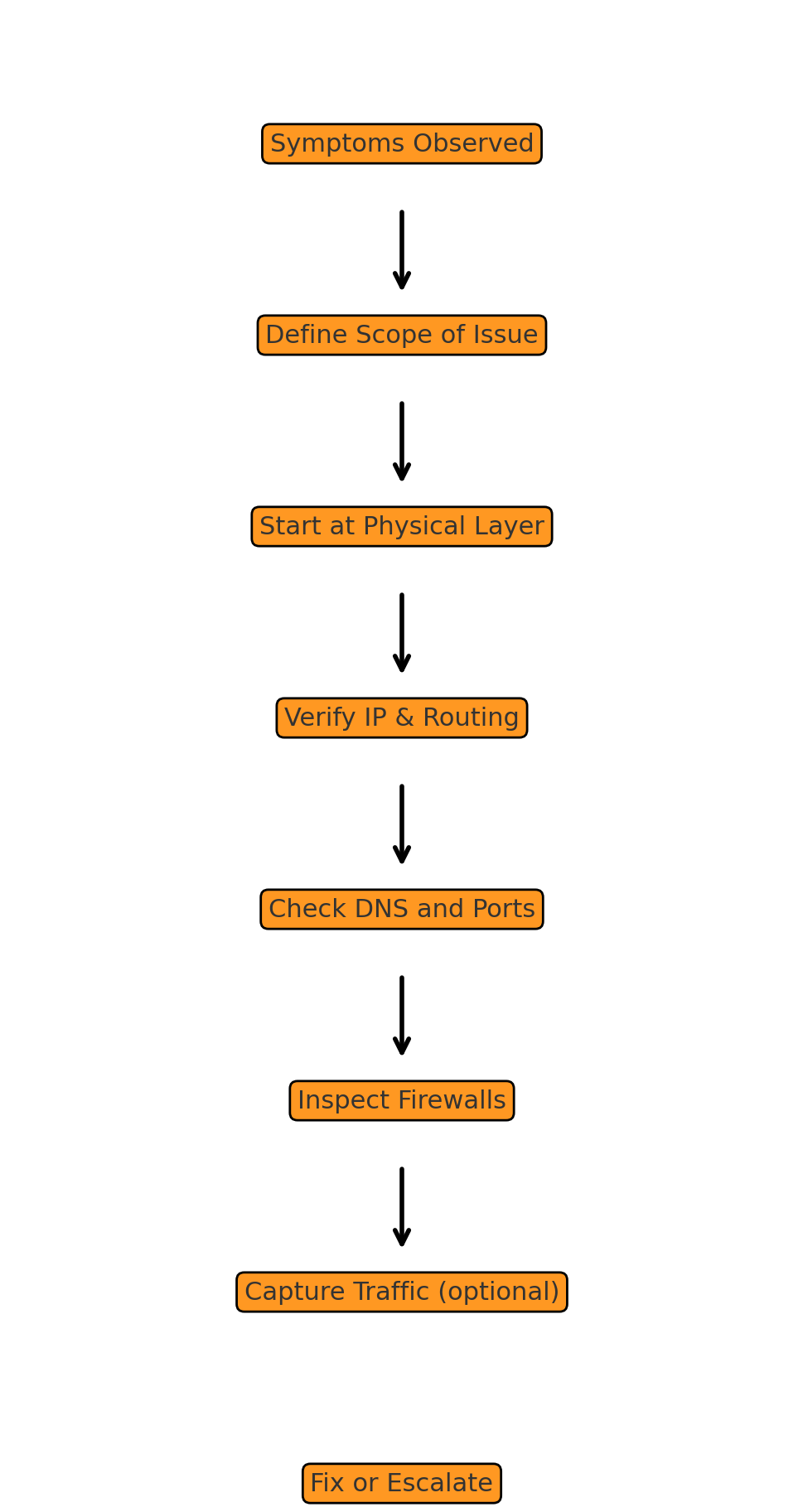
Step-by-Step Troubleshooting Workflow
1. Define the Problem Clearly
- What is broken?
- Who is affected?
- When did it start?
Good question: “Can host A ping host B?”
Bad question: “The network is down.”
2. Check Physical Layer (Layer 1)
- Are cables connected?
- Is the network interface up?
- Try: ip link, ifconfig, link lights
3. Verify IP Configuration (Layer 3)
- Is the IP address correct?
- Does the subnet match?
- Try: ip addr, ping, traceroute
4. Check Network Connectivity
- Can you ping your gateway?
- Can you reach the internet?
- Try:
ping 8.8.8.8 traceroute google.com
5. Inspect DNS Resolution (Layer 7)
- Is DNS working? Try:
nslookup example.com dig example.com
6. Test Port Availability (Layer 4)
- Is the right port open?
- Try:
nc -zv server.example.com 443 telnet server.example.com 22
7. Check Firewall Rules
- Is the traffic being blocked?
- Check:
- iptables (Linux)
- ufw, firewalld
- Security group policies (AWS/GCP)
8. Look for Routing Problems
- Run:
ip route show traceroute
9. Capture Traffic (Advanced)
- Use tcpdump or Wireshark to view live traffic
- Filter for failed handshakes or dropped packets
Diagram: Troubleshooting Flow
Real-World Tools for Troubleshooting
Tool
Purpose
ping
Test connectivity
traceroute
Show path packets take
tcpdump
Packet capture and inspection
nslookup
DNS resolution
ip/ifconfig
Show network interfaces
nc / telnet
Test port-level connectivity
Wireshark
Deep packet analysis (GUI)
Cloud vendor logs
Audit traffic (AWS VPC Flow Logs)
Common Network Problems and Fixes
Problem
Likely Cause
Fix
Cannot ping gateway
Cable unplugged or wrong IP
Check physical and Layer 3 config
Slow internet access
DNS lag, packet loss
Try alternate DNS, test latency
Remote service unreachable
Firewall rules or port block
Open port, allow IP
VPC to VPC traffic fails
Overlapping CIDRs, bad route tables
Use NAT, VPN, or redesign routes
Internal app not resolving
DNS record missing or stale
Flush DNS, fix record
Troubleshooting in Modern Networks
In today’s infrastructure, networks are more complex:
- Cloud-native apps: Move across nodes frequently
- Multi-cloud: Require VPNs or peering to connect
- Overlapping subnets: Cause routing failures
- Ephemeral services: Spin up/down rapidly, breaking static rules
Traditional network troubleshooting assumes:
- Static IPs
- Predictable paths
- Manual configuration
But that’s no longer the world we live in.
How noBGP Changes Network Troubleshooting
Troubleshooting modern networks often involves guessing where the problem lies across:
- IPsec tunnels
- NAT translations
- DNS resolution delays
- Cloud security policies
- Complex BGP routes
noBGP eliminates most of these problems by providing:
Deterministic, Private Routing
- You know exactly which path traffic takes—no more BGP guesswork.
Identity-Based Connections
- Workloads talk to each other using identity, not IP. No subnet planning needed.
No NAT, No Overlapping IPs
- noBGP allows overlapping CIDRs across VPCs—no collisions, no broken paths.
End-to-End Encryption by Default
- No need to troubleshoot IPsec or TLS termination on routers.
Instant Logging and Policy Visibility
- You can see what’s allowed, what was denied, and why—no hunting through AWS logs.
Summary: Troubleshooting with and without noBGP
Feature
Traditional Network
With noBGP
Troubleshooting path
Multi-layered guess
Deterministic, direct visibility
Subnet overlap issues
Frequent
Eliminated
DNS/NAT dependencies
Always involved
Not needed
Toolchain needed
Many
Minimal (built-in policies)
Configuration complexity
High
Low
Final Thoughts
Network troubleshooting is a critical skill, but traditional methods are becoming more painful as infrastructure complexity grows. Static IPs, manual firewall rules, and BGP-based routing create brittle systems with long mean-time-to-resolution (MTTR).
With noBGP, you take back control. Traffic flows based on identity and policy—not on unpredictable public infrastructure. Troubleshooting is simpler, faster, and more transparent.
Why debug a pile of route tables when you could just know it works?
Choose your path with noBG
